🎮 Discord Bio Generator
Create the perfect Discord profile bio with AI — free & instant!
Your Discord Bio Is the First Thing People Notice About You
Discord has grown far beyond gaming. Today it is home to communities built around art, music, coding, education, business, crypto, content creation, and almost every other interest you can think of. With millions of active servers and users, standing out on Discord starts with one simple thing: your profile bio.
Your Discord bio appears on your profile and is visible to anyone in a shared server who clicks on your username. It is your introduction to every community you are part of. A blank bio or a rushed one-liner sends the wrong signal. A well-crafted bio, on the other hand, builds instant credibility and makes people want to connect with you.
Writing a bio that captures your personality, fits Discord’s culture, and leaves a good impression is not always straightforward. That is exactly what a Discord Bio Generator is built for. This free AI-powered tool helps you create the perfect Discord bio in seconds.
What Is a Discord Bio Generator and How Does It Work?
A Discord Bio Generator is a free online tool that uses AI to create a personalized Discord profile bio based on the information you provide. Discord allows up to 190 characters in the bio section of a standard profile, and Nitro users get up to 400 characters. The tool generates bios that work within these limits naturally.
What makes this tool different from just writing a bio yourself is the quality and creativity of the output. Discord culture is unique. It rewards personality, wit, and authenticity over formal descriptions. The AI understands that tone and produces bios that actually fit the platform.
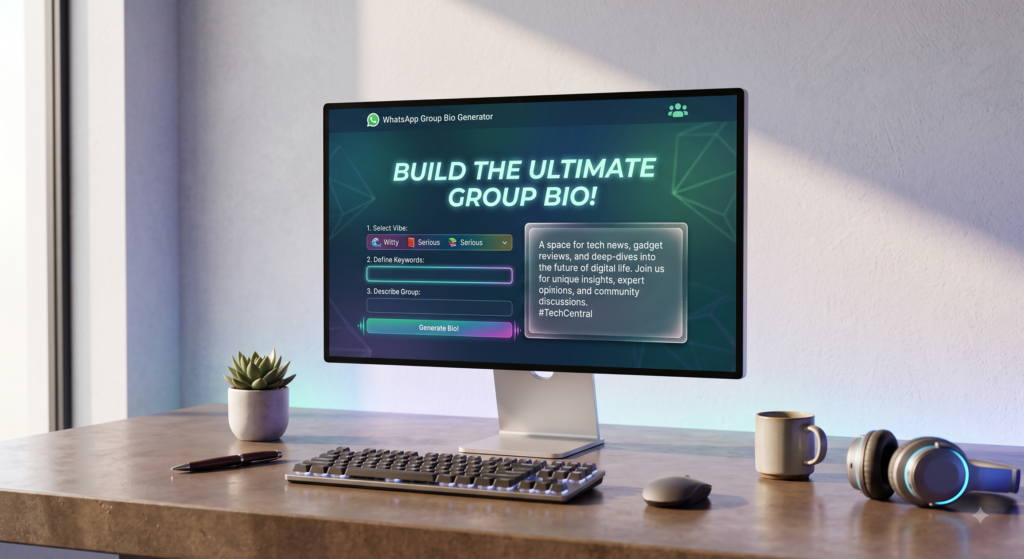
Here is how it works:
- You visit the Discord Bio Generator page on the website.
- You enter details about yourself such as your interests, hobbies, the servers you are active in, or your online persona.
- You select a writing style such as gamer, creative, professional, funny, aesthetic, or chill.
- The AI generates multiple ready-to-use bio options instantly.
- You pick the one that feels most like you, copy it, and paste it into your Discord profile settings.
Fast, simple, and completely free with no account needed.
Key Features of the Discord Bio Generator
Character Limit Friendly The tool generates bios that fit within Discord’s 190-character standard limit. Nitro users can also generate longer bios up to 400 characters to take full advantage of their profile space.
Discord-Specific Tone Discord is not LinkedIn. The tool understands the platform’s casual, community-driven culture and produces bios that sound natural on Discord rather than stiff or overly formal.
Multiple Writing Styles Choose from a range of tones including gamer, anime fan, developer, artist, streamer, aesthetic, witty, mysterious, and more. Your bio will match exactly how you present yourself online.
AI-Generated Original Content Every bio is freshly produced based on your input. No recycled one-liners, no generic templates. Each result feels personal and unique to you.
Several Options Per Session You get multiple bio variations at once so you can compare them and choose the one that fits your vibe best.
Completely Free with No Sign-Up The Discord Bio Generator requires no account, no email, and no subscription. Open the page and start generating immediately.
Works on All Devices Whether you are on desktop, laptop, or mobile, the tool runs smoothly and is easy to use from any device.
Step-by-Step Guide: How to Use the Discord Bio Generator
Creating your Discord bio with this tool is quick and straightforward. Follow these steps:
- Step 1: Go to the Discord Bio Generator page on the website.
- Step 2: Enter your Discord username and a short description of who you are or what you are into.
- Step 3: Add details about your interests, favorite games, hobbies, or the type of communities you are part of.
- Step 4: Mention anything specific you want in the bio such as your timezone, what you are open to, or your content niche.
- Step 5: Choose a writing style or tone that matches your personality.
- Step 6: Click Generate and review the bio options the AI creates.
- Step 7: Select your favorite, copy it, open Discord, go to your profile settings, and paste it into the About Me section.
Your Discord profile now has a genuine, well-crafted bio that represents you across every server you are in.
Benefits of Using a Discord Bio Generator
- Saves time: Crafting a bio that fits Discord’s culture and character limit takes effort. The tool delivers great results in seconds.
- Sounds authentic: The AI produces bios that feel natural on Discord, not robotic or out of place.
- Better first impressions: A strong bio makes other server members more likely to interact with you and take your contributions seriously.
- Builds community connections: When people read a bio that resonates with them, they are more likely to reach out, add you, or collaborate.
- Multiple styles to match your vibe: Whether you are a casual gamer or a serious developer, the tool has a tone for you.
- No writing experience needed: The AI does all the creative work so you do not have to struggle with what to say.
- Reusable anytime: Update your bio whenever your interests shift or you want a fresh look on your profile.
Helpful Tips for the Best Discord Bio
Lead with something memorable. Your first line sets the tone for the entire bio. Start with something that immediately communicates who you are or what you are passionate about.
Match the culture of your main server. If you are mostly active in gaming servers, lean into that. If you are in creative or professional communities, adjust your tone accordingly. A bio that fits your primary community always performs better.
Add your interests specifically. Instead of saying “I like games,” say which games. Instead of “I enjoy music,” mention your favorite genre or artist. Specificity makes your bio relatable and sparks conversation.
Include your timezone if relevant. For international servers or gaming communities where coordination matters, adding your timezone is genuinely useful information that people appreciate.
Keep it honest. Discord communities value authenticity. A bio that accurately reflects who you are will always build better connections than one that tries too hard to impress.
Refresh it regularly. Your interests evolve and your online persona changes. Come back to the Discord Bio Generator whenever you feel your current bio no longer represents you well.
Who Should Use the Discord Bio Generator?
This tool is perfect for anyone who uses Discord and wants a stronger profile presence.
- Gamers who want a bio that reflects their gaming identity, favorite titles, and playstyle.
- Content creators and streamers who use Discord to connect with their community and want a bio that matches their brand.
- Developers and tech enthusiasts active in programming or tech servers who need a bio that communicates their expertise clearly.
- Artists, musicians, and writers who share their creative work in Discord communities and want a bio that introduces their craft.
- Students and study group members who want a bio that shows their academic focus and makes them approachable to peers.
- Server admins and moderators who want a professional, trustworthy bio that reflects their role and commitment to the community.
- Anyone joining a new server who wants to make a strong first impression from the moment they arrive.
Conclusion
Your Discord bio is a small piece of text with a big impact. It shapes how hundreds of people across different servers perceive you. A thoughtful, well-written bio builds trust, sparks conversations, and makes you a recognized presence in every community you join.
The Discord Bio Generator makes it effortless to create that bio without the guesswork. In just a few clicks, you have a platform-appropriate, personality-driven, and character-limit-perfect bio that is ready to publish immediately.
Stop leaving your Discord profile without a proper bio. Try the Discord Bio Generator for free today and start making the kind of first impression that actually opens doors.